

Sounds like either your card is faulty, or your system isn't able to supply enough power.yes I did try that it did nothing for my model everything besides DirectX does work and everything directx does get a driver panic and subsequent crash (I used Frankendrivers so far)
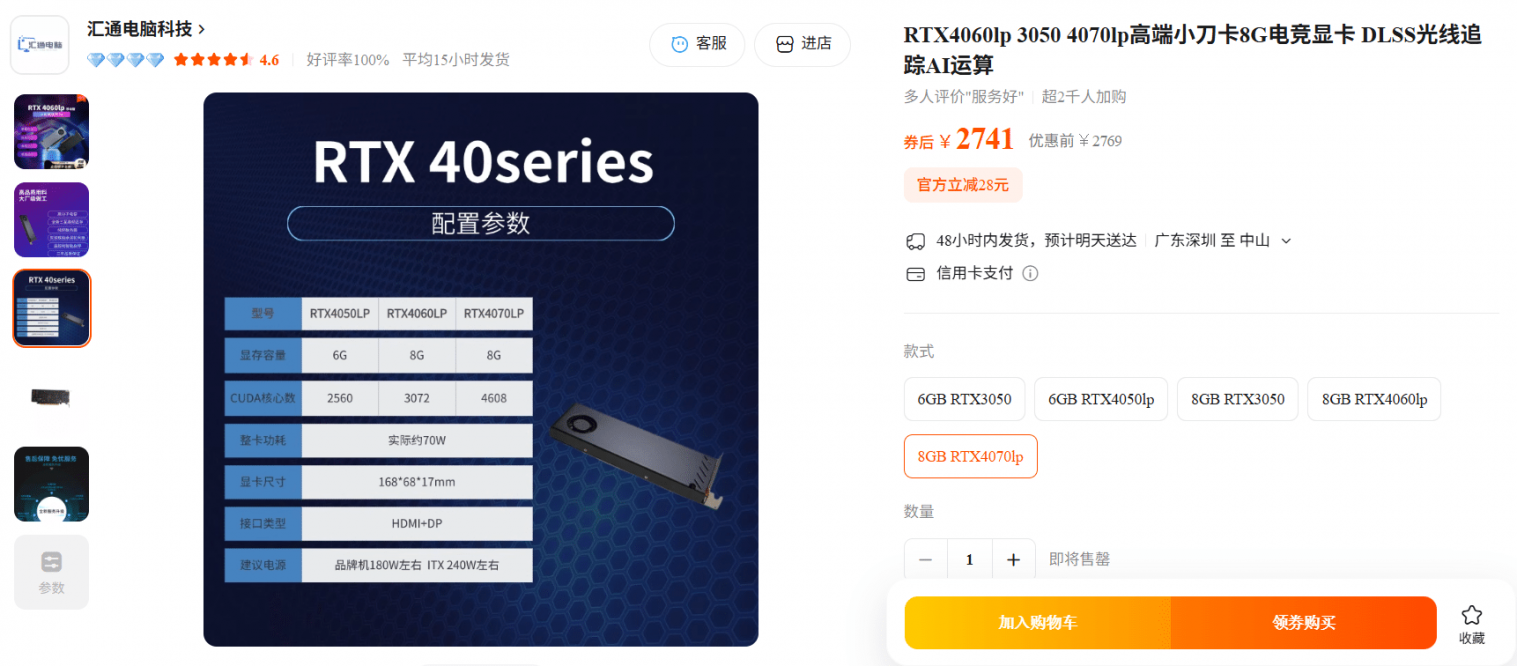
GPU Low Profile & Single Slot RTX 4060/4070 (Frankenstein) from Taobao
- Thread starter REVOCCASES
- Start date
You are using an out of date browser. It may not display this or other websites correctly.
You should upgrade or use an alternative browser.
You should upgrade or use an alternative browser.


Hi,
Any users pair RTX 4060m / 4070m with Lenovo P330 / M920x / M920q / M720q tiny?
Any peculiar issue encounter?
Hmm this sounds risky. Any reason you need to use RTX mobile?
And what kind of RTX 4060m / 4070m are we talking about?

Hi,
Any users pair RTX 4060m / 4070m with Lenovo P330 / M920x / M920q / M720q tiny?
Any peculiar issue encounter?
I've seen a couple of builds with the MINISFORUMs and TINYs (but mainly P3/P360) and haven't heard of any special issues so far.
Hmm this sounds risky. Any reason you need to use RTX mobile?
And what kind of RTX 4060m / 4070m are we talking about?
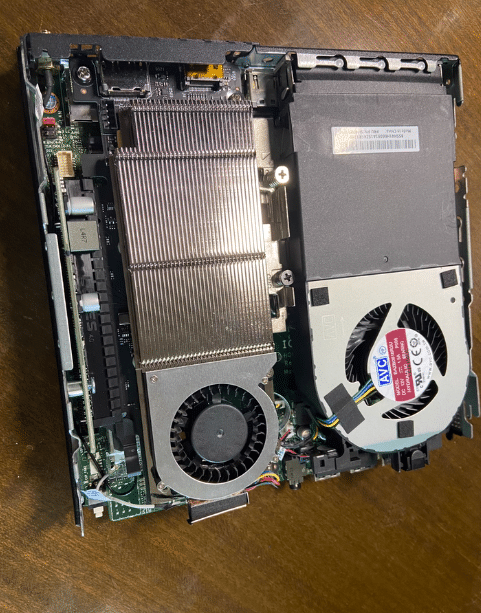
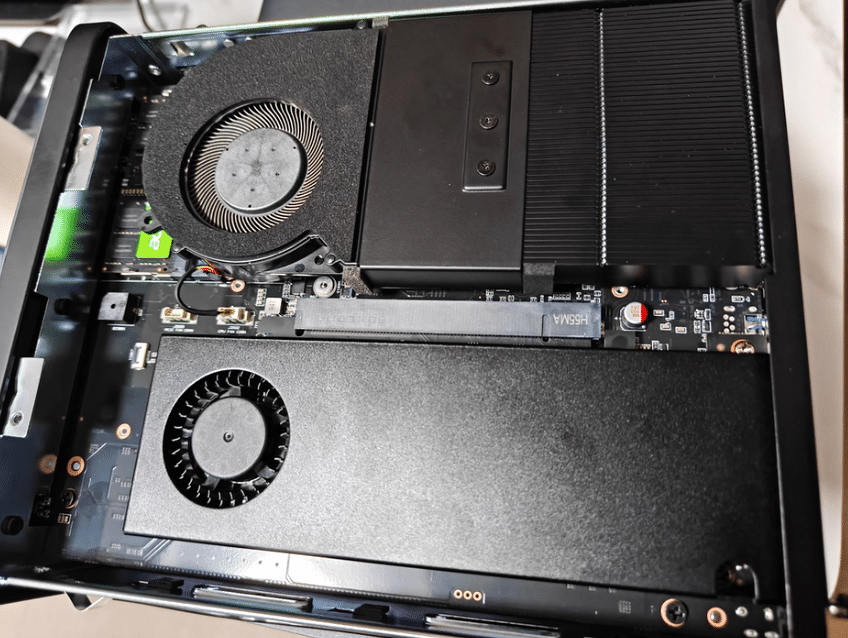

It's single slot well fit into 1L Lenovo Tiny chassis.Hmm this sounds risky. Any reason you need to use RTX mobile?
And what kind of RTX 4060m / 4070m are we talking about?
For couch gaming, online streaming and self curiosity satisfaction purposes.
China modded mobile gpu into single slot for desktop usage as OP first page.
just to update...
The 4060lp from Huitong I received is rated 80W.
Runs well in my Lenovo P330 Tiny modded PR1111.
By default temperature is kinda high, luckily it's can be undervolt via MSI Afterburner.
The 4060lp from Huitong I received is rated 80W.
Runs well in my Lenovo P330 Tiny modded PR1111.
By default temperature is kinda high, luckily it's can be undervolt via MSI Afterburner.
I've seen a couple of builds with the MINISFORUMs and TINYs (but mainly P3/P360) and haven't heard of any special issues so far.
View attachment 4043
View attachment 4044
View attachment 4042
Thanks for the confirmation @REVOCCASES .
@K3NNY glad it works. Mind to share what kind of temperature you are having with it?
Thanks for the confirmation @REVOCCASES .
@K3NNY glad it works. Mind to share what kind of temperature you are having with it?
HWINFO reads
Maximum Gaming Temperatures
(tested with TLOU part 1)
CPU: ~73°C @ ~40W
GPU: ~76°C @ ~75W
Average Gaming Temperatures
(tested with TLOU part 1)
CPU: ~62°C @ ~24W
GPU: ~60°C @ ~42W
Minimum Idle Temperatures
CPU: ~41°C @ ~4W
GPU: ~37°C @ ~6W
HWINFO reads
Maximum Gaming Temperatures
(tested with TLOU part 1)
CPU: ~73°C @ ~40W
GPU: ~76°C @ ~75W
Average Gaming Temperatures
(tested with TLOU part 1)
CPU: ~62°C @ ~24W
GPU: ~60°C @ ~42W
Minimum Idle Temperatures
CPU: ~41°C @ ~4W
GPU: ~37°C @ ~6W
These are after undervolt?
Interesting, there's such a big diff between the average VS the maximum gaming temp.
I hope the max is just like in millisecond.
yes, the max temperature last in milisecond onlyThese are after undervolt?
Interesting, there's such a big diff between the average VS the maximum gaming temp.
I hope the max is just like in millisecond.
plus it's harder to tweak the undervolt due to 1L crammed tight space and air flow restricted
plus it's harder to tweak the undervolt due to 1L crammed tight space and air flow restricted
Totally understand, yeah. It's already decent result you have there.
Ok so I figured out the process.
Here it is:
Install 7zip if you already don't have it installed
Run NVCleanstall 1.19.0 (current as of September 2025)
Select: Manually select driver version and Show all versions
Select: 581.29 Windows 10/11 64bit Notebook DCH (current as of September 2025).
Click Next
On the "Select Components to install" screen, select everything
Click Next
Wait for all the files to download and extract
On the "Installation tweaks" screen select: "Add Hardware Support"
For "Template", from the drop down menu select: GeForce GTX 1650 with Max-Q Design [1F91.0032.1414] nvmsoi.inf
For: "Id" add 2860 so the entire line reads: PCI\VEN_10DE&DEV_2860
For "Name" append "4070m" at the end of : NVIDIA Graphics Device so it looks like this: NVIDIA Graphics Device 4070m
Click Next
Click Build Package, give it a name: newdriver.exe
Once the package is built, you can exit NVCleanstall.
Run the new compile driver and follow installation prompts. Make sure to select Express Install function.
After the installation is complete, you will notice in Device Manager the GPU comes up as: NVIDIA GeForce RTX 4070 Laptop GPU (with a yellow exclamation mark)
In Windows Explorer Right click on your newdriver.exe and select 7zip -> Extract. to: "newdriver\"
Wait till the decompression is done and go back to Device Manager
Right click on the NVIDIA GeForce RTX 4070 Laptop GPU (with yellow exclamation mark) and then select: Update Driver
Select: Browse my computer for drivers
Select: Let me pick from a list of available drivers on my computer
Select: have disk -> browse
point at the "newdriver/Display.Driver" directory where the extract driver is and select: nvmsoi -> Open -> Ok
Select: NVIDIA Graphics Device 4070m -> Next
Wait for drivers to finish installing. Your GPU should now be up and running correctly without yellow checkmark in Device Manager.

Sorry to resurrect an old post but I ordered a Abovetop 4070m Low profile from newegg (Came fast too only 3 days) and I did your driver method and it worked but it had mouse hitching every once in awhile (in which you move your mouse cursor rapidly and see it glitched or missed a few frames) and gaming was bad to say the least, had the same lagging and missed frames as the mouse.
It had the device 2860 like yours except when I got mine I noticed an email for support on the box. So I emailed the guy to which I told him what I did for drivers and he said don't use any official or custom ones just email him so I did he gave me ones he built in September, he said he could make a more recent one if I wished I told him the one he gave me was fine for now. I was wondering if you know how to mess with drivers and such would you like me to upload it and you can take a look at it?

NVCleanstall is the only way I know how to. mess with drivers. There's also Frankendriver if you wanna give that a go.Sorry to resurrect an old post but I ordered a Abovetop 4070m Low profile from newegg (Came fast too only 3 days) and I did your driver method and it worked but it had mouse hitching every once in awhile (in which you move your mouse cursor rapidly and see it glitched or missed a few frames) and gaming was bad to say the least, had the same lagging and missed frames as the mouse.
It had the device 2860 like yours except when I got mine I noticed an email for support on the box. So I emailed the guy to which I told him what I did for drivers and he said don't use any official or custom ones just email him so I did he gave me ones he built in September, he said he could make a more recent one if I wished I told him the one he gave me was fine for now. I was wondering if you know how to mess with drivers and such would you like me to upload it and you can take a look at it?
Have you tested the prebuilt drivers for malware ? I don't trust prebuilt stuff so I build my own.
I will send it to you when I get home I'm at work right now I did scan it for any viruses I did unzip it like in your tutorial with 7 zip nothing came on my antivirus if you want to scan it see if it has nothing you welcome to I'll zip it up so it's not in a exposed state and you can check it out yourself.
The method described by @LukeD worked well for my 4070m if you follow everything step-by-step. Frankendriver didn't work at all. The drivers provided by the vendor also worked fine and never had any viruses.
4070m Official driver Here is the vendors driver, like Revoccases said I had no viruses no problem. I zipped it up if you wanna take a look, take it apart the frankendriver worked for most part, but like I said when you moving the mouse and then it jumps to the place you move to rather than seeing it move that is a problem for me at least.NVCleanstall is the only way I know how to. mess with drivers. There's also Frankendriver if you wanna give that a go.
Have you tested the prebuilt drivers for malware ? I don't trust prebuilt stuff so I build my own.
Try it on an older Nvidia driver. And make sure you're also selecting the Notebook drivers, not desktop.4070m Official driver Here is the vendors driver, like Revoccases said I had no viruses no problem. I zipped it up if you wanna take a look, take it apart the frankendriver worked for most part, but like I said when you moving the mouse and then it jumps to the place you move to rather than seeing it move that is a problem for me at least.
Maybe way out of my depth. I have a Abovetop 4070m, I believe it's rated at 80w as well.just to update...
The 4060lp from Huitong I received is rated 80W.
Runs well in my Lenovo P330 Tiny modded PR1111.
By default temperature is kinda high, luckily it's can be undervolt via MSI Afterburner.
In my lenovo m90q gen 3, I am running into this issue, where not matter the driver I get installed successfully I crash on the desktop after a reboot.
Not getting any crashes on the basic driver..
I have the appropriate power supply (230w, with a 300w on the way), but I think my gpu maybe spiking and its exceeding that ~70 limit on the PCI slot. Looking into bios flashing because I am not able to get into something like MSI afterburner before it crashes. Hesitant to flash anything, maybe there is a better way? Considering ditching the whole project, but really want to get it going. Any tips?
Got three specific drivers to get to the desktop.
The vendor, thank you Sicksorrow
Luke's NVcleanermethod
Frankendriver
All lead to the same result, a crash about 3 seconds on the desktop. Not really sure where to start until I get that replacement adapter.
I don't crash on the iGPU if I boot with HDMI connected there first.
For now I'm just going to do what I can for now
Update bios
Update windows (idk why this would be the issue)
Try different cables, DP and HDMI
Last if needed, use a linux distro like Luke suggested
If you have any ideas they would be appreciated! Hope I can help someone in the future!
The vendor, thank you Sicksorrow
Luke's NVcleanermethod
Frankendriver
All lead to the same result, a crash about 3 seconds on the desktop. Not really sure where to start until I get that replacement adapter.
I don't crash on the iGPU if I boot with HDMI connected there first.
For now I'm just going to do what I can for now
Update bios
Update windows (idk why this would be the issue)
Try different cables, DP and HDMI
Last if needed, use a linux distro like Luke suggested
If you have any ideas they would be appreciated! Hope I can help someone in the future!
Similar threads
- Replies
- 59
- Views
- 87K


- Replies
- 14
- Views
- 17K

- Replies
- 479
- Views
- 159K

- Replies
- 8
- Views
- 9K
