CPU [08/07/2025]ASRock DeskMini X600 BIOS "4.06" & "4.08" & "4.10" & "4.12" - with AMD AGESA ComboAM5Pi v1.2.0.3e Patch.A & DDR5 SO-DIMM Voltage Settings

matti

Cable Smoosher
Apr 26, 2025
11
17
I just wanted to ask: Can anyone of you boot from Windows to UEFI(Bios) via Windows command line? Commad to boot to UEFi is shutdown /r /fw /t 0

My X600 always gets just blinking _ Same happens if I want to access bios and I press delete key to early or spam delete key. Just want know if this is feature of X600 or somekind bug in my X600. Never had this problem with X300.
 
D

Deleted member 18826

Guest
I have no problems accessing the BIOS on my X600 Deskmini with command line (shutdown.exe /r /fw /f /t 0) or by spamming DEL key.
I heard that Asrock is quite friendly when it comes to customer service regarding BIOS problems, maybe it is worthwhile contacting them. Hope it helps.
 
  • Like
Reactions: matti

BigMax

Caliper Novice
Mar 26, 2025
25
15
I just wanted to ask: Can anyone of you boot from Windows to UEFI(Bios) via Windows command line? Commad to boot to UEFi is shutdown /r /fw /t 0

My X600 always gets just blinking _ Same happens if I want to access bios and I press delete key to early or spam delete key. Just want know if this is feature of X600 or somekind bug in my X600. Never had this problem with X300.
same here, no problems at all
 
  • Like
Reactions: matti

BigMax

Caliper Novice
Mar 26, 2025
25
15
My scratchy hands don't let me leave the mini alone and just work...

Few weeks back i suddenly saw the x300 mini case (btw, it is 100% compatible with x600 tray and mobo, all holes match, maybe issues with backside m2 slot but i am not sure, looks like it should be fine, but doublecheck needed) sold here at local second-hand marketplace for around $20 equivalent, ok, i thought, why not go a little bigger as you guys told me :) so I've bought the case as i wanted to keep an option to go back to small nicely looking case i.e. full stock. Just to mention that i do not really like the 3d printed plastic cases as i think (maybe wrong) that metal cases are better in terms of cooling performance.

Next, i started hunting for NH-L12Sx77, and besides it was nearly impossible to get it locally, it was bloody expensive at ~$90 equivalent.

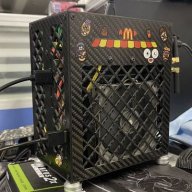
But one day, local marketplace showed me this beauty


at just around $16 equivalent, delivered from China and it was cheaper that ali offered.
It is called TEUCER 8 or MC75-8 or snowman MC75-8 or call it anyway. But it has 120mm heat sink, good ram clearance and 8 heatpipes.

Here are some specs:

So i bought it.

Next, i made some test-fits and tried to figure out on what to cut on the case side panel and spend around 30 mins to draw the cutting lines but i still fucked the position and cut a little bit too much of a case, but still not too much, so i have some space to install moldings to hide the cut edges. But i love it!

I have thrown away the stock fan since i had the Silverstone Air Slimmer 120 so i put it on. More to the point i have also detached the front panel, to allow better air exhaust and it really looks like terminator :)

What i also did, is i purchased the Maxtor ctg10 thermal paste which is one of the best according to Igor's lab tests. It's hard to apply but it does the job well i believe.

Moved the mobo with tray to new case, turned on, adjusted the fan curve in Fan control to the comfortable audio and here is is what i have:
Idle = 35C (dead silent)
office work, lite photo editing, browsing = 37-40C (dead silent)
gaming = 60-65C (almost dead silent, just a minor whispering)
OCCT at hardest profile = 75C (just a little more audible whispering that when gaming)

Fan blows in and that makes RAM stays just a little cooler than with Thermalright AXP90-47 FULL so i might try the fan blowing out as i expected better ram temps with this 120mm fan

So i'm happy as i drastically improved in terms of noise, but i also feel that games run a little faster now, maybe because iGPU boosts higher with better cooling, will see and make some tests if i have time.

So i will see how to make cut edges look better, maybe i have a 3d printed fanduct/cover and i also want a kind of mesh of something for the front panel, but so far i like the way it looks!

Looks like i do not want to delid my 8700G as of now as i am happy with termals and noise.

Thanks for inspiration and motivation!

PS. The MC75-8 cooler is a very nice budget alternative to noctua... well made, looks nice, mounts are awesome and it is cheap, really liked it.

 
Last edited:
D

Deleted member 18826

Guest
Amazing. I love it. Good job!

Reversing the fan may improve memory thermals but it will be at expense of cpu temps, or at least that's what happens in my open case deskmini.
 

sandyware

Trash Compacter
Jul 6, 2024
34
58
Greetings to the users of the DIY MiniPC ASRock DeskMini X600, I am opening a thread here for those who wish to have the possibility of adjusting the voltages of their DDR5 SO-DIMM RAM kits (I know for a fact that you wish to do so😅) as well as the vSOC, so I am sharing with you a link to download a Beta BIOS that I got from a friend (who himself got it directly from ASRock support).

This is version "4.01.MEM01", but be careful this bios uses an AGESA ComboAM5Pi firmware version "1.1.0.2b" which is less recent than the one present in the latest official BIOS "4.03" (which has version "1.2.0.0a"), so be careful this last one will not support the new AMD Ryzen 9000 series which will be released soon (you need at least a BIOS with the AGESA ComboAM5Pi firmware "1.1.7.0" to be able to run these), I will keep you informed if I ever manage to get BIOSes with more recent AGESA firmware and which of course have the RAM voltage settings available.

One last thing, do not hesitate to share your results and tests with this Beta BIOS, or even if you have questions or suggestions about the settings/overclocking results of the DDR5 SO-DIMM kits, because knowledge in overclocking and its sharing is a very important thing...

[!UPDATE!]

20/08/2024:
So I have two big news, one good and one excellent, the good: I just received from ASRock support the test BIOS "4.03.MEM01" which is literally the same BIOS as the official version "4.03" but with full access to the DDR5 RAM voltage settings/parameters (as in the previous test BIOS "4.01.MEM01") and having the ASESA firmware updated to version "1.2.0.0a" and therefore support for Zen5 "Granite Ridge" CPUs (Ryzen 9000 series CPUs).

And finally the excellent news is that ASRock "BIOS" department has finally made the decision to natively integrate these DDR5 RAM voltage settings/parameters into the next official BIOS updates of the DeskMini X600 (AGESA v1.2.0.1 and later). I think that the many users who reported their problems to stabilize their DDR5 SO-DIMM 6000MHz and 6400MHz RAM kits (the latter even being validated in their QVL RAM for the DeskMini X600) must have played a big part in this decision, as well as the fact that I pointed out to them that in the official PDF manual of the DeskMini X600 motherboard (ref X600M-STX) downloadable on the support page, there is clearly and explicitly the description and native presence of these said parameters/settings on pages 30 and 31, which proved a voluntary (and not really justifiable) limitation of access to these parameters. In short, it is a good thing and finally a proof of good faith and understanding of their customers to put to their credit, to have agreed to come back on this painful limitation.

Of course I added the new test BIOS "4.03.MEM01" to the online upload folder, if you want to test it. One last thing, do not hesitate to share here in this thread any problems/bugs (even if they are minimal and very little annoying) that you have encountered, I will quickly report them and keep you informed of their "hypothetical" management/feedback of these.

06/12/2024: Greetings everyone, I just received from ASRock Support, the test BIOS "4.04" including the AMD AGESA ComboAM5PI firmware "1.2.0.2a" (which is the penultimate one known to date, the latest being version "1.2.0.2b") without further details on what bugs were fixed or additional features. I uploaded it to the usual upload folder and it is available for testing immediately if you wish.

08/12/2024: Added new Test-BIOS "4.06" (a big thanks to phorize), changes: no idea😅, same AGESA ComboAM5PI firmware "1.2.0.2a" as the "4.04" Test-BIOS​

13/12/2024: Added new Final-BIOS "4.08" , changes: Officialy only AGESA ComboAM5PI "1.2.0.2a" update, but... definitive 150 Watts Max TBP 🤬🤬🤬🤬

---------------------------------------------------------------------------------------------------------------------------------------------------------------------------------
last update:
---------------------------------------------------------------------------------------------------------------------------------------------------------------------------------

24/03/2024: Added new Final-BIOS "4.10" : unofficial changes: fix NVMe SSD write corrupt in linux distros, official change: -Optimize system compatibility

---------------------------------------------------------------------------------------------------------------------------------------------------------------------------------

Link[RE-UP 10/06/2025]:

Bro, the download link has expired. Could you please reupload it? Thanks a lot!
 

carpler

Cable Smoosher
Nov 27, 2024
8
5
After several months, I finally managed to assemble my PC with the Deskmini X600.
The configuration is very similar to that of many of you:

ASRock DeskMini X600
AMD Ryzen™ 7 8700G
Thermalright AXP-90 X47 Full Cooper with Noctua fan
Kingston Fury Impact XMP 32GB 6400M KF564S38IBK-16 x 2
SSD KINGSTON 1Tb SKC3000S1024G

I installed Windows 11 Pro with the latest updates, downloaded and installed the latest drivers directly from the AMD website (Adrenalin Edition 25.6.1).
I installed 4.03.MEM01 as the BIOS.
The power supply I use is the one provided by Asrock.
I made only one change in the BIOS: I chose the 6400 XMP profile for the RAM, all other options remained at their default settings.
I'm not entirely sure that the profile has been saved and is working correctly: on HWiNFO, I don't know how to read if the profile is set up correctly.

The system immediately began to show signs of instability.
In fact, very often (at least once during every work session), the screen freezes for a few seconds, then briefly turns black, and then resumes normal operation.
On this occasion, the AMD software reports the following error:
‘AMD software detected that a driver timeout has occurred on your system’
and suggests sending a report.
I would like to point out that these ‘freezes’ occur at times when the PC is NOT under stress: at the moment, I have only been browsing and doing some coding. Temperatures should not be a problem either (those I have detected so far are below 50°).

Has anyone else experienced something similar? If so, how did you solve it?
Is it a BIOS problem?
Do you have any ideas on what to try to make the system more stable?
 

matti

Cable Smoosher
Apr 26, 2025
11
17
After several months, I finally managed to assemble my PC with the Deskmini X600.
The configuration is very similar to that of many of you:

ASRock DeskMini X600
AMD Ryzen™ 7 8700G
Thermalright AXP-90 X47 Full Cooper with Noctua fan
Kingston Fury Impact XMP 32GB 6400M KF564S38IBK-16 x 2
SSD KINGSTON 1Tb SKC3000S1024G

I installed Windows 11 Pro with the latest updates, downloaded and installed the latest drivers directly from the AMD website (Adrenalin Edition 25.6.1).
I installed 4.03.MEM01 as the BIOS.
The power supply I use is the one provided by Asrock.
I made only one change in the BIOS: I chose the 6400 XMP profile for the RAM, all other options remained at their default settings.
I'm not entirely sure that the profile has been saved and is working correctly: on HWiNFO, I don't know how to read if the profile is set up correctly.

The system immediately began to show signs of instability.
In fact, very often (at least once during every work session), the screen freezes for a few seconds, then briefly turns black, and then resumes normal operation.
On this occasion, the AMD software reports the following error:
‘AMD software detected that a driver timeout has occurred on your system’
and suggests sending a report.
I would like to point out that these ‘freezes’ occur at times when the PC is NOT under stress: at the moment, I have only been browsing and doing some coding. Temperatures should not be a problem either (those I have detected so far are below 50°).

Has anyone else experienced something similar? If so, how did you solve it?
Is it a BIOS problem?
Do you have any ideas on what to try to make the system more stable?
I would try lower XMP profile, if that fixes freezes. Memory related things can cause different type of problems. It also could be that your processor just can't do 6400MT/s. 5200MT/s is official AMD supported speed for these, but most of CPU's can hit atleast 6000MT/s.

Also there is somekind bug with PBO, which causes crashes. Don't know if it has been fixed in latest bios. Asrock also did have problem killing CPU's(mostly x3D) with their overpowered PBO-settings. I don't know if DeskMini had these "Asrock settings".

I use my 8600G clocked at 4800MHz->lowers temperatures. Memory is at 4800MT/s. 6400MT/s produced too much heat for my liking. I haven't tested If there has been any change in the newest bios.
 
  • Like
Reactions: Phuncz and carpler

carpler

Cable Smoosher
Nov 27, 2024
8
5
Thank you so much for your reply!

I would try lower XMP profile, if that fixes freezes. Memory related things can cause different type of problems. It also could be that your processor just can't do 6400MT/s. 5200MT/s is official AMD supported speed for these, but most of CPU's can hit atleast 6000MT/s.

It seems strange to me...
It seems that there are several people here who have the 8700G and the same RAM modules as me. Has anyone managed to use the modules at 6400?

Also there is somekind bug with PBO, which causes crashes. Don't know if it has been fixed in latest bios. Asrock also did have problem killing CPU's(mostly x3D) with their overpowered PBO-settings. I don't know if DeskMini had these "Asrock settings".

I use my 8600G clocked at 4800MHz->lowers temperatures. Memory is at 4800MT/s. 6400MT/s produced too much heat for my liking. I haven't tested If there has been any change in the newest bios.

I also suspect that it may be a BIOS issue. I stayed with version 4.03MEM01 because I hoped to be able to use a more powerful power supply than the one supplied with the X600 (which I have not yet purchased) and the ‘performance mode’, but at this point, it may be better for me to test more recent versions of the BIOS (perhaps the recently released 4.12).
Any suggestions about that?

I also have another question: once the BIOS has been upgraded, is it possible to revert back or not?
 
  • Like
Reactions: matti

matti

Cable Smoosher
Apr 26, 2025
11
17
Thank you so much for your reply!


It seems strange to me...
It seems that there are several people here who have the 8700G and the same RAM modules as me. Has anyone managed to use the modules at 6400?


I also suspect that it may be a BIOS issue. I stayed with version 4.03MEM01 because I hoped to be able to use a more powerful power supply than the one supplied with the X600 (which I have not yet purchased) and the ‘performance mode’, but at this point, it may be better for me to test more recent versions of the BIOS (perhaps the recently released 4.12).
Any suggestions about that?

I also have another question: once the BIOS has been upgraded, is it possible to revert back or not?
6400MT/s depends highly from memory controller. Not all CPU's can do that. But getting bad one is just like winning jackpot in bad luck lottery. There are things you could try. Lowering SOC voltage, if I remember correctly this can too high. You did use XMP profile? Also setting memory aggressive can cause instability.

Also I would not use that Asrock menu which has PBO, temperature limit, Curve Optimizer. I had always random crashes with these profiles. Like watching Youtube video caused blue screen.

I think that using Bios flashback feature in these X600's should allow lower bios versions to be flashed. No I haven't tested this.

Also noticed that I didn't set my settings after updating to 4.12. Noticed that I cannot set negative 250MHz clocks with this newest bios(4.10 allowed this). Negative 200MHz is kind of working. Don't know if it is CachyOS or Bios but sometimes btop++ reports 4.9GHz clock at CPU. Also I have been running 6000MT/s memory clock for a day. Temperatures are high like always 51C, but it is hot day in Finland(28C outside).

Edit. Don't know why but negative 250MHz works now. I did restore defaults settings.
 
Last edited:
  • Like
Reactions: carpler

carpler

Cable Smoosher
Nov 27, 2024
8
5
After several days with an unstable PC, I upgraded to BIOS version 4.12: after flashing, I loaded the default values. For the RAM, the profile set is 4800.
I haven't touched any of the default values at the moment.
In this situation, the system is stable with temperatures about 8° lower.
After reading what @matti wrote, I took a look and it seems that the best frequency for my 8700G is 6000.
Before trying to set the RAM differently, I would like to try a few small benchmarks for each step to understand what advantage I can gain from settings other than the current ones.
Which test(s) do you suggest I try?
 
  • Like
Reactions: HydrAxx747

matti

Cable Smoosher
Apr 26, 2025
11
17
After several days with an unstable PC, I upgraded to BIOS version 4.12: after flashing, I loaded the default values. For the RAM, the profile set is 4800.
I haven't touched any of the default values at the moment.
In this situation, the system is stable with temperatures about 8° lower.
After reading what @matti wrote, I took a look and it seems that the best frequency for my 8700G is 6000.
Before trying to set the RAM differently, I would like to try a few small benchmarks for each step to understand what advantage I can gain from settings other than the current ones.
Which test(s) do you suggest I try?
For memory stability I would use Testmem5(CoolCMD modded in github, Anta(Absolut/Extreme-profile)). Alternative would be Karhu ramtest(paid software). Also memory testing takes time. One pass is not often enough. Some errors can be seen after multiple hours and passes.

Cpu stability probably Prime95, maybe OCCT and games(Fallout 4 has always been picky with unstable system).

Memory speed Aida64 memtest->It is not good benchmark, as there are many things how Windows operates affects its scoring. Also Aida64's CPU test's can be used to see if something changed in results.

If I were you I would probably load 6000MT/s-profile and test stability. Then maybe look for those tighter profiles for timings->from same place where Expo profiles are.

If you are not happy with 6000MT/s, then there is 6400MT/s and other speeds. One option is changing memory clock ratio from 1:1 to 1:2. This should make 6400MT/s stable, but it is not useful with penalty you will get from it. But higher memory speeds will lower this penalty and you get more speed in some cases. Other way how you could get 6400MT/s(mem 1:1) stable is tuning timing's and voltages. This is why I did list Testmem5 and Karhu ramtest. Also the time you will lose, when you start testing.

Couple days now I have been using memory at 5600MT/s profile->It has lower voltage settings in Expo-profile. So temperatures are not that high as the 6000MT/s and 6400MT/s-profile. When I got this X600, I did test this with 5800MT/s with 5600MT/s-profiles timings(6000 would not boot). Reason why I haven't used this was Asrock PBO, Curve optimizer menu and it's unstable settings for me.
 

carpler

Cable Smoosher
Nov 27, 2024
8
5
I continued with my tests: still using BIOS 4.12, I set the XMP 6000 profile and noticed that this time the VDD_SOC value was set to 1.20V (not 1.30V).
The other values all seemed correct to me (VDDIO 1.35V, VDDQ 1.35V, etc.).
With the new profile, the “normal” temperatures immediately rose by 5° or 6°.
Initially, however, the system seemed stable, but after a few days of use it started to become unstable, in the sense that I had sudden system reboots, sometimes even more than one in quick succession.
After yet another reboot, I tried to test the RAM: using MemTest86+ 7.20, I immediately got thousands of errors.
I stopped the test and reset the AUTO profile in the BIOS (which selects the RAM frequency at 4800): with this profile, when I relaunched MemTest86+, the test passed without errors.
To do a further test, I selected the XMP 6000 profile again, but what surprised me was that this time the MemTest86+ test passed without any problems.
However, I believe that this profile is highly unstable, exactly as reported by @matti : in fact, after selecting it, when I restarted the PC, I had two or three black screens, i.e. the system would not start (I couldn't even get to the BIOS), even though I didn't hear any error beeps.
At first, I thought it was a problem with the monitor and the DisplayPort connection, but after rereading matti's post, perhaps that's not the case.
I really don't know what to think.
Is it possible that with RAM modules listed in the official Asrock compatibility list, there is no way to use it to its full potential?
Could it be that some of my hardware components are faulty? The RAM? The 8700G?
Or is it simply the BIOS (or the motherboard!) that has problems?
I'll try the XMP profiles suggested by matti in the next few days, but I'm very disappointed with the X600's performance so far.
 

matti

Cable Smoosher
Apr 26, 2025
11
17
I was thinking how could I help. Now that I have bios settings open in program, makes easier to me remember things:

0. Reset bios. Load a just XMP profile. Nothing else. Test memory stability and use for couple of days. If it crashes->more voltage to ram and maybe SOC.

1. I would not touch OCTweaker/Performance Preset menu at all->this caused my random black screen/blue screen problems. I would not even look that menu option in bios. Also limiting temperature can help->If there is something which is getting really hot->system is unstable->Setting is below Performance Preset.

2. For PBO and Curve optimizer if needed:
-Press CTRL+Q in bios->this should give you more settings->AMD CBS and couple more options
-AMD CBS/SMU Common options. Is the place where you can find these settings for Curve optimizer and many more settings like controlling PBO with positive/negative values, PPT etc.
-I would not play with every setting CTRL+Q shows you. There can be settings which can cause harm to whole computer.

For ram: I don't personally use MemTest86(+). What I have heard it is not that good these days. We both have Kingston 6400MT/s memory kits. Probably you also have Hynix A-die chips in those sticks. Those should easily managed 6400MHz or more. Just finding the right settings is the key.

Or there is something wrong with Memory sticks or processor's memory controller is just a 💩
 

bgravato

Case Bender
New User
Jan 3, 2025
2
3
Hi,

I've had a Deskmini X600 with Ryzen 8600G since December, after having a X300 for a couple of years before that. Both running Linux >99% of the time.

The X300 worked flawlessly on linux since I got it (which was much later after its initial release). On the other hand, the X600 I think is still suffering some "growing pains", at least on Linux.

I bought the Kingston Fury 6400 RAM, but I think it was a waste of money... Loading the XMP profiles to 6000 or 6400 will significantly increase power consumption! I've measured it with a power meter on the wall socket... idle power consumption jumped from 10-12W (or less) to over 20W (I don't remember the exact numbers, this was a few months back, but it was more than double the power consumption). So if more power is drawn, more heat is being produced somewhere... which is consistent with what other people reported here. This huge increase in power consumption happens when the loaded profile pushes voltage from 1.1V to 1.3V (also as reported by others).

I was also experiencing some occasional system crashes/freezes on linux (usually with some critial error messages in the logs, prior to the crash, related to the amdgpu driver). I'm not sure if the root cause of these crashes was due to having the RAM at 5600 or some "bugs" (or lack of full support) on the linux kernel. I've set the RAM to 4800 some time ago and I haven't experienced any crash recently, but this could also have been due to some kernel upgrade in the meanwhile...

Also a BIG WARNING for linux users out there... there was a nasty bug for linux users that was causing some occasional data corruption on disk. This only happened if you had one nvme disk on the main M.2 slot, and the secondary M.2 slot empty (if you had both slots occupied or a single disk on the secondary slot instead, the problem didn't ocurr). This was fixed on BIOS 4.10 and the "Optimize system compatibility" in the description of the BIOS 4.10 given by ASRock probably refers to that (I wish they had more detailed and accurate description of their changelog).
So if you're running linux on the X600, make sure you upgrade to bios 4.10 or later.

I just noticed there's a newer 4.12 version and I'm wondering what "Enhance system compatibility" might mean... Anyone has any clue on what really changed in 4.12? Which nasty bug did they fix on this one?
 

matti

Cable Smoosher
Apr 26, 2025
11
17
Don't know about bios bugs, other than using OCTweaker/Performance Preset menu causes instability for me. Also I can't get to bios by pressing del(whole system gets stuck), but pressing F2 works almost always->unless you have really unstable memory timings. Asrock won't tell us about bios bugs. I have been running 4.12 version when it was downloadable.

I have been using CachyOS for 2 months. No system problems, everything works.

Only new thing I have noticed in last two weeks: Is that I can now start my X600 via moving the mouse. Yes I do select Shutdown from menu, computer does shutdown, no blinking blue led. To me this is not a bug, it is a new feature. No need to press power button.
 

BigMax

Caliper Novice
Mar 26, 2025
25
15
Hi carpler! If you still need help i can give some advise, you can read my tests above (previous page) when i played with profiles and voltage and where i ended up. I believe you are in the same forest. In a nutshell I am now with RAM at 6400, cool and quite. My advise would be to manually set the profile to 6400, then set vsoc to ~1.2 and make tests, then lower vsoc as much as stability allows (i keep mine at 1.0) and then play with curves for per core (not for whole CPU) CPU negative values. That was my recipe. BTW, i run 4.03MEM01 bios from the first page. I can post screens again if needed.
 
  • Like
Reactions: carpler